
Introduction
In this lesson, we will cover the following useful extensions to the SELECT statement: DISTINCT, COUNT, and GROUP BY.
DISTINCT
The DISTINCT keyword is optional in a SELECT statement. The DISTINCT keyword can be used to remove duplicate rows in the result set.
The general SQL syntax is as follows:
SELECT DISTINCT column_name_list
FROM table_name;
This syntax can now be used to generate a list of all the university’s faculties (column TeacherFaculty) from the Teachers table:
SELECT DISTINCT TeacherFaculty
FROM Teachers;
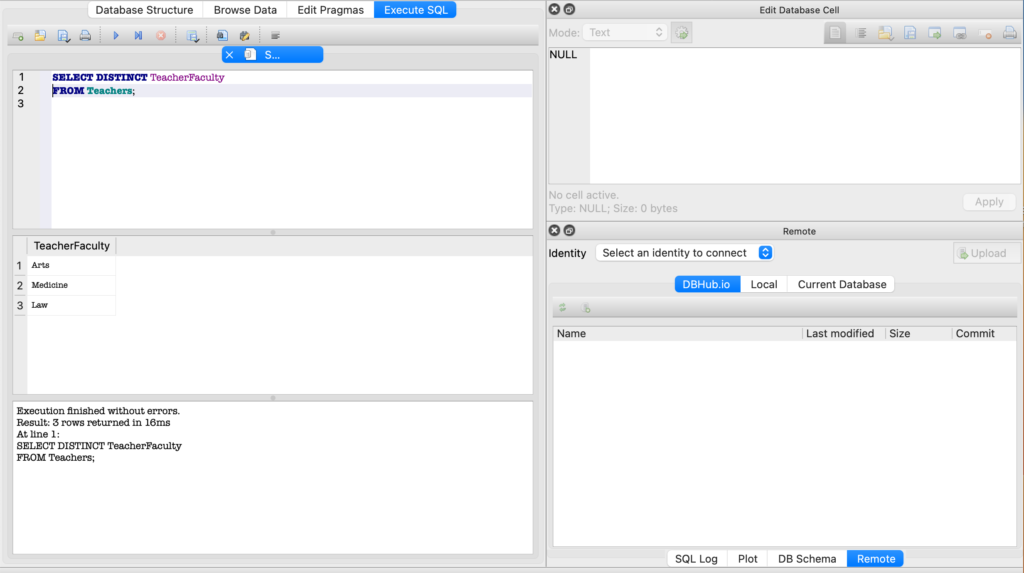
Without the DISTINCT keyword, each faculty would appear multiple times in the result set.
If you list multiple column names after the DISTINCT keyword, all of the listed columns are used together to check for duplicates.
The DISTINCT keyword must immediately follow the SELECT keyword!
COUNT()
In an SQLite SELECT statement, you can also use a number of functions, such as COUNT(), AVG(), MAX(), MIN(), and SUM(). The AVG() function calculates the average of some values. In this lesson, we’ll use the COUNT() function to demonstrate how these functions can be used.
The COUNT(*) or COUNT(ALL) function counts the number of rows in a table. All rows are counted, including those with NULL values.
SELECT COUNT(*)
FROM Teachers;
The SQL statement above counts all rows in the table Teachers.
If you explicitly reference a specific column in the COUNT() function, empty (NULL) fields are not included in the count.
SELECT COUNT(StudentName)
FROM Students;
The SQL statement above counts all rows in the Students table where the StudentName field contains a NON-NULL value.
GROUP BY
The GROUP BY clause groups rows with the same values in one or more columns into summary rows. These summary rows can then be used to calculate values using the functions (COUNT(), MAX(), MIN(),…) described in the previous paragraph.
The general syntax of an SQL statement when using GROUP BY is as follows:
SELECT column_name_list
FROM table_name
[WHERE conditional_expression]
[GROUP BY column_name_list]
[ORDER BY column_name_list];
If used, the GROUP BY clause must appear after the WHERE clause.
In the following example we create summary rows per TeacherFaculty:
SELECT TeacherFaculty, COUNT(TeacherLastName)
FROM Teachers
GROUP BY TeacherFaculty;
The following screenshot shows how the GROUP BY clause is used in DB Browser:
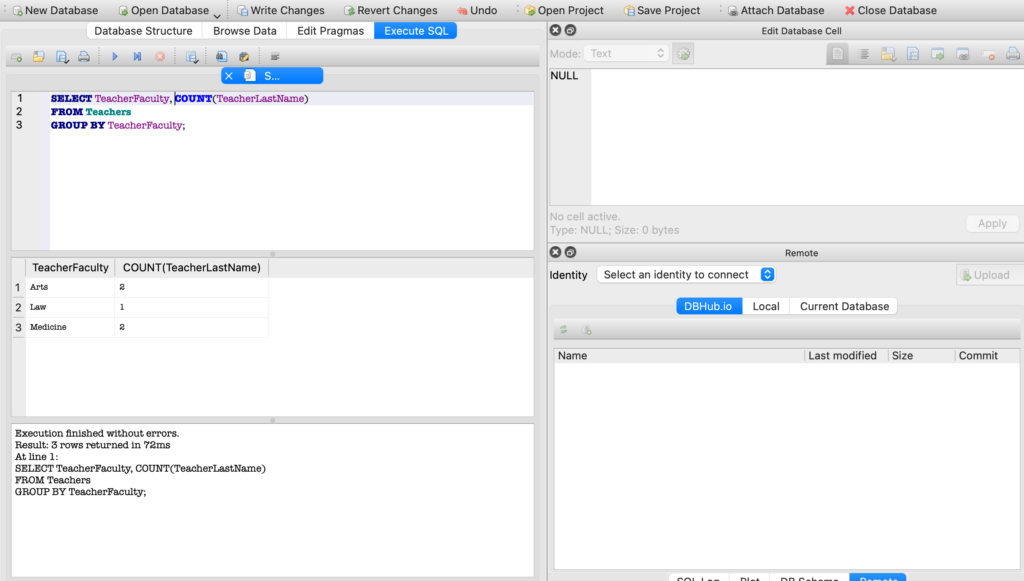
The GROUP BY TeacherFaculty clause creates summary rows based on the values in the TeacherFaculty column. Each summary row is then used to display the number of faculty members (COUNT(TeacherLastName)) per faculty (TeacherFaculty).
The GROUP BY clause will be very useful if you want to perform calculations (MAX(), MIN(), AVG()) on, for instance, invoices broken down by customer within a company, or on exam results by student at a university… Before using any of these functions, group the data by customer or by student.